
Michael Overhorst (ViezeVingertjes)
The KISS Modem
What the KISS Modem firmware role is, what it isn’t, and who it’s for.
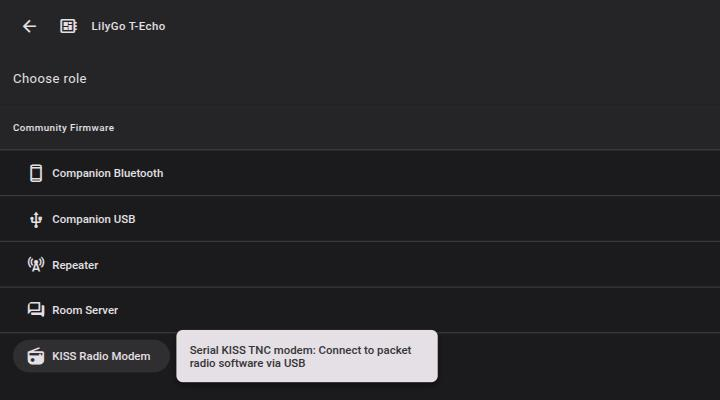
Since v1.16.0 the flasher has had a KISS Modem role for most boards (the role picker calls it “KISS Radio Modem”), and going by the questions on Discord the name confuses people. So, a quick rundown.
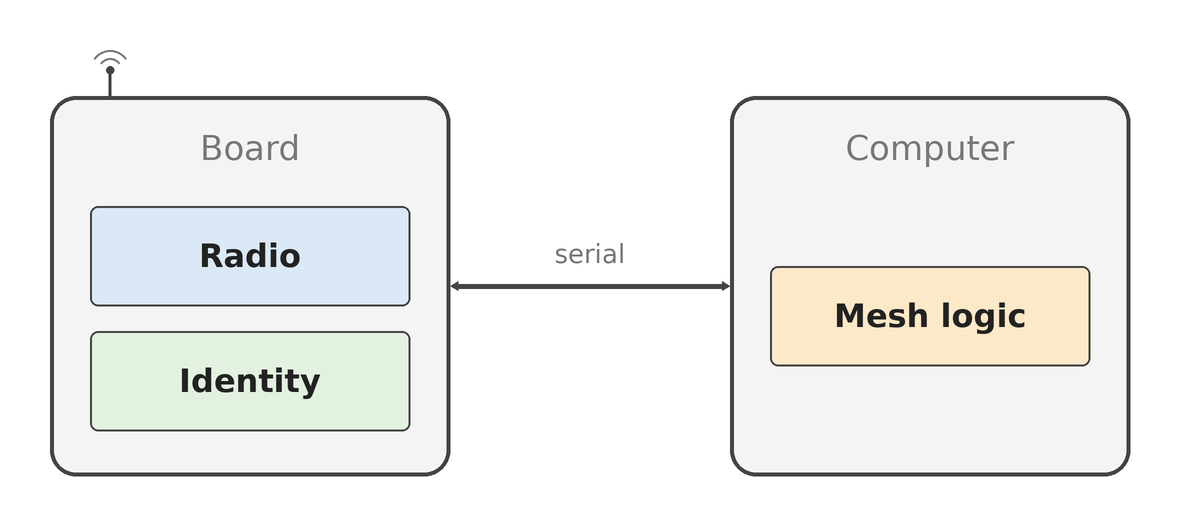
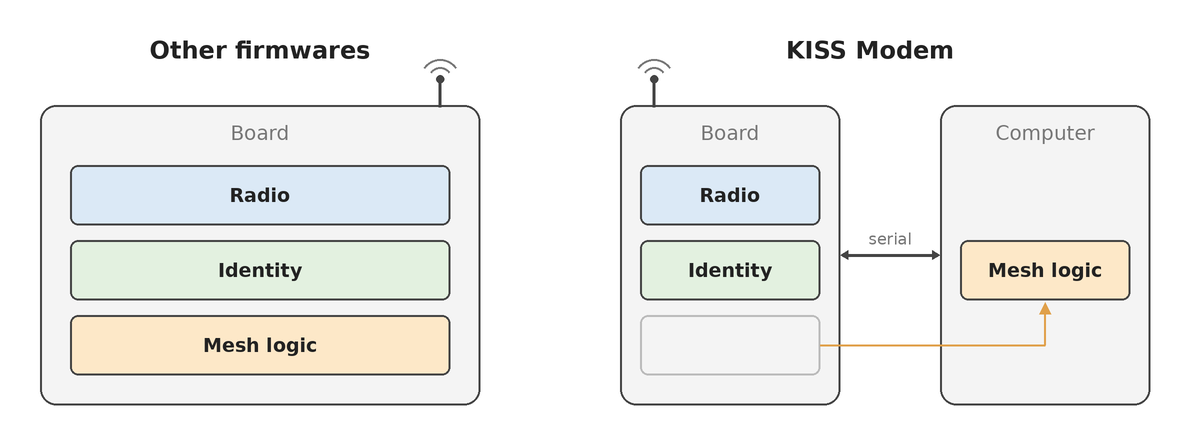
It’s the same MeshCore firmware and the same radio underneath. What changes is how you talk to the board: instead of the app, you open a serial port and speak KISS, an old and very simple protocol that amateur radio packet modems (TNCs) have used for decades. The radio stays on the board. Everything that decides what to send, and what to do with whatever comes back, runs on the computer at the other end of the cable. What you end up with is closer to a LoRa dongle for MeshCore than a node in its own right.
Who it’s for
Most people don’t need it. If you want to message from your phone, companion firmware plus the app is where to start.
The KISS Modem is for people building gateways or services on a proper computer. OpenHop (formerly pyMC) is the obvious example and can use a KISS Modem as its radio.
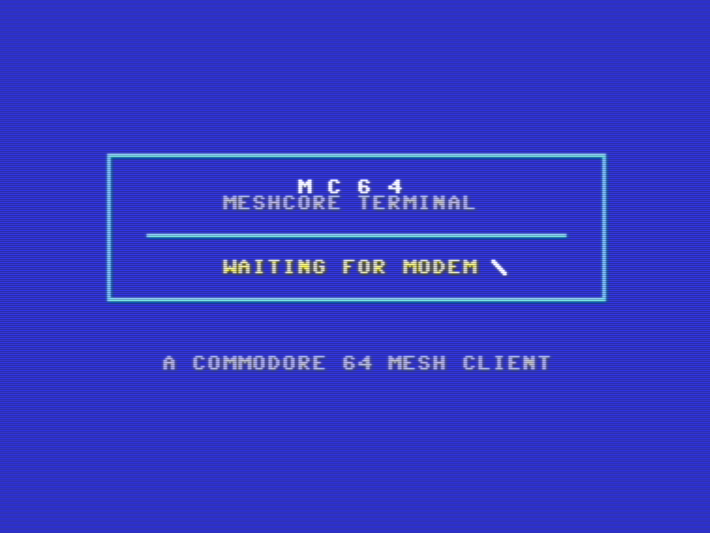
It doesn’t have to be a proper computer though. I have a Commodore 64 chatting on the mesh through one, over the user port at 600 baud, which is about all the stock KERNAL serial routines can keep up with. The C64 builds the packets and draws the screen, the modem does the LoRa and the AES.
It’s also handy if you want to poke at MeshCore packets from a laptop in whatever language you like, without flashing custom firmware for every idea. (The companion firmware can hand you raw packets too, and since 1.16 send them, but here you get the whole radio with nothing in the way.)
What is KISS?
Keep It Simple, Stupid. It’s the framing amateur packet radio has used between a computer and a TNC since the 80s. MeshCore didn’t invent it, it borrowed it because it’s simple and there are libraries for it in every language.
The way I think of it: KISS is the envelope, the MeshCore packet is the letter inside.
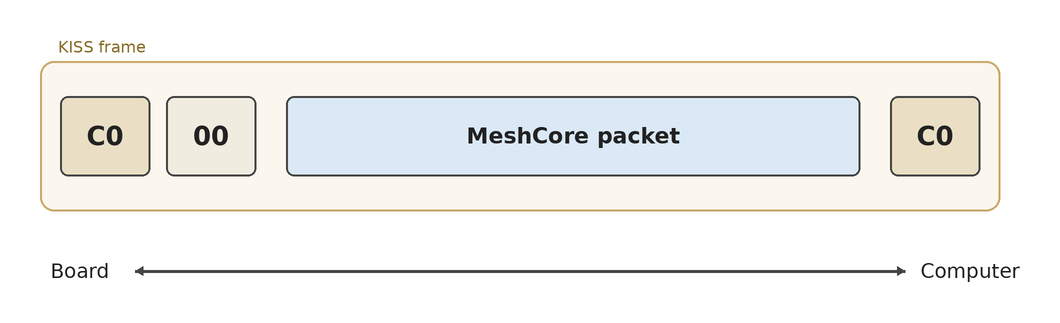
A C0 byte on each end, a type byte, and the packet in between. That’s why the protocol doc says any KISS client (Direwolf, APRSdroid and so on) can drive the modem: they’ll happily push raw frames out through the radio. It doesn’t get them onto the mesh though. They can open the envelope, but what’s inside means nothing to them, and the mesh won’t make anything of what they send either.
On top of plain KISS the firmware adds the MeshCore extras (radio settings, signal reports, battery, crypto) through a standard KISS command that plain clients ignore.
What the board does
Quite a lot, it just doesn’t do any of the mesh logic. It sends and receives raw MeshCore packets over LoRa. Received packets come up the serial link exactly as they came off the air, each with a signal report (RSSI and SNR) attached, and your software decides what to do with them.
The host sets the radio up: frequency, bandwidth, spreading factor, coding rate and transmit power. You can also ask the board for its battery voltage, the noise floor, packet counters and whatever sensors it has, and it can estimate how long a packet would take on air at the current settings. The protocol doc has the full list.
None of the radio settings survive a reboot. Apart from the board’s key pair nothing is saved, so your software sets the radio up each time it connects.
It listens before it transmits so it won’t talk over other traffic, and it takes one packet at a time: it tells you when a packet has gone out and refuses a second one until then.
The board has its own key pair, generated on first boot and stored in flash. The private key can’t be read out, so if you want the board’s identity on the mesh you ask the board to sign and do key exchanges for you. It can also encrypt, decrypt and verify with keys you hand it. Or you skip all of that. The board sends whatever bytes you give it and doesn’t check them, so a host that keeps its own key pair builds valid packets without ever touching the board’s crypto. OpenHop does it that way. The C64 goes the other way entirely, it hasn’t got the horsepower for AES so it hands every message to the modem to encrypt or decrypt.
What it leaves out: routing, repeating, chat, room server. All of that lives on the host side.
Flashing it
Flashing is the same as any other role.
- Head to flasher.meshcore.io
- Pick your board
- Choose the KISS Radio Modem role
- Flash it
- Open the board’s serial port at 115200 baud, 8N1, from software that speaks MeshCore
Step 5 is where the real work lives. On nearly every board that serial port is the USB one. There is a compile-time option (KISS_UART_RX and KISS_UART_TX) to move that onto bare UART pins if you want to wire the board straight to a Pi header, but you’ll need to build the firmware yourself for that.
If you’d rather not write the serial side yourself, OpenHop already has it. If you do want to roll your own, the KISS Modem protocol doc covers the serial side and the packet format page covers what goes inside the frames.
Where to start
- Flasher: https://flasher.meshcore.io
- Protocol doc: https://docs.meshcore.io/kiss_modem_protocol
- Packet format: https://docs.meshcore.io/packet_format
- OpenHop: https://github.com/openhop-dev/openhop_repeater
If you get something running on it, post it on the Discord, I’d like to see what people wire it into.